

Quick answer
The simplest way to manage a service business is to give every customer and every job one reliable record, then move each job through a clear sequence from request to completion. The team should be able to see who the customer is, what was promised, who is responsible, what happens next and whether the job is complete without searching through messages or calling the owner. Spreadsheets, calendars and WhatsApp can support communication, but they should not be the place where the business stores its operational truth.
Why a growing service business becomes difficult to control
A service business rarely becomes chaotic overnight. The first few customers are easy to remember. The owner answers every call, knows every address and can tell each employee what to do. A calendar shows the appointments, a spreadsheet records prices and WhatsApp carries photos and last-minute instructions.
That arrangement can work while the owner remains close to every job. The problem appears when the number of customers, employees and daily handoffs grows. Information starts moving faster than one person can reliably remember it. A customer changes an address in a message. A technician sends a photo to the wrong group. A completed job is not invoiced because the office never receives confirmation. Nobody makes a dramatic mistake, but small gaps accumulate.
Good service business management removes that dependency. It gives the whole team a shared, current view of the work while preserving clear responsibility for each decision.
The five signs that your current system is breaking
The first warning is scattered customer information. Contacts, addresses, prices and photos live in different tools, so nobody sees the full relationship. The second is repeated status checking: managers call employees to ask whether they arrived or finished. The third is dependence on individual memory for access details, prices or previous complaints. The fourth is unclear responsibility, with several people involved but nobody accountable for the next action. The fifth is delayed administration after the physical work is complete, which leads to missing notes, slow invoicing and weak records.
If two or more of these patterns happen every week, the business has probably outgrown its informal system.
Build one reliable record for every job
The central unit of a service business is the job. A calendar event only records time. A chat records conversation. A spreadsheet row stores selected fields. A proper job record connects the complete operational story.
At minimum, a job record should contain the customer, service address, contact details, requested service, agreed date, assigned people, operational status, notes, documents and relevant photos. It should also preserve changes so another team member can understand what happened without reconstructing the story from several tools.
The customer record and the job record should remain connected but distinct. The customer record describes the relationship over time. The job record describes one piece of work. A returning customer should not be entered as a new contact for every visit, and a new job should not overwrite the history of previous work.
This distinction becomes increasingly important as the business grows. It allows the office to see the full customer history while field employees receive only the information required for the current assignment.
Use a simple job lifecycle
A useful job lifecycle answers one question at every stage: what must happen next?
Soroby uses eight operational stages: New, Confirmed, Scheduled, Arrived, In Progress, Finishing, Ready and Completed. A company may use different labels, but the logic should stay simple. Each status must describe a real operational condition, not a vague impression.
New means that the request exists but has not yet been fully agreed. Confirmed means the customer and company have agreed on the service. Scheduled gives the job a working date or time. Arrived records that the team or item has reached the relevant location. In Progress shows that work has started. Finishing covers quality control and final preparation. Ready means the service is complete and waiting for delivery, collection or final handoff. Completed closes the operational cycle.
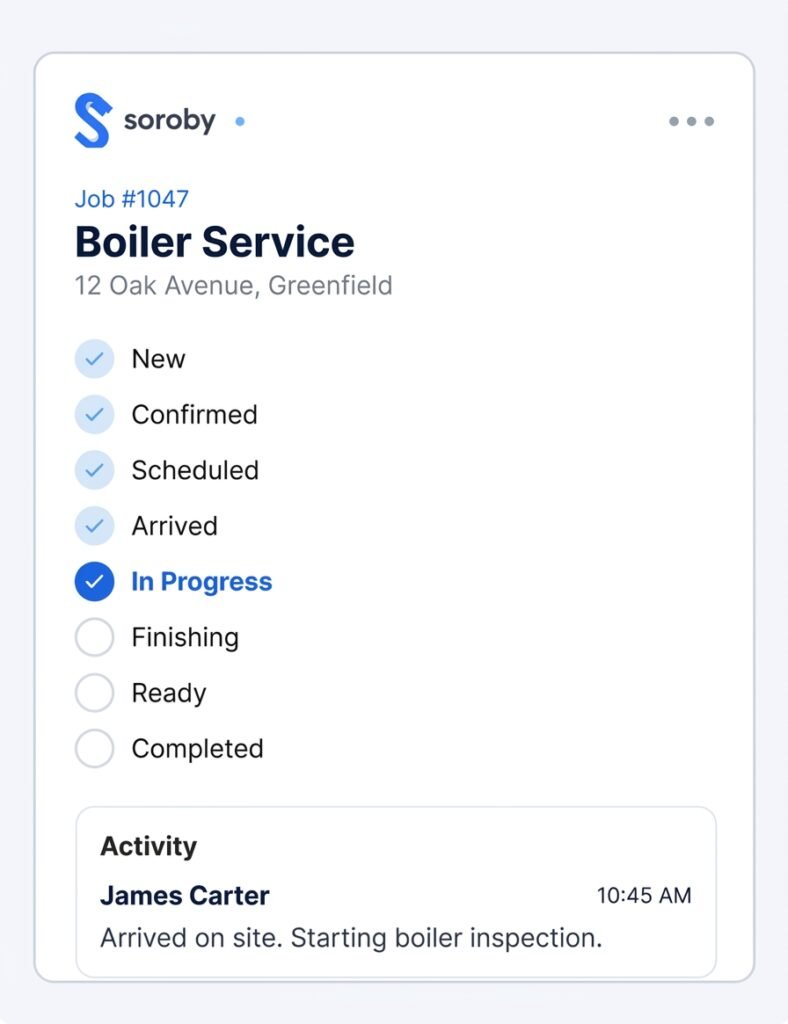
The purpose of these stages is visibility. An owner should be able to look at the system and immediately see where work is accumulating. Ten jobs in Finishing may indicate a quality-control bottleneck. Several confirmed jobs without schedules may indicate that office capacity is falling behind demand.
Separate operational status from payment status
One common mistake is to mix work progress and payment into one status list. Terms such as Completed, Invoiced, Partially Paid and Paid describe different dimensions.
Operational status answers whether the work has been performed. Payment status answers whether the company has received the money. A job can be completed and unpaid, or paid in advance while it is still scheduled. Combining the two creates confusing status combinations and unreliable reporting.
Keep Paid and Unpaid separate from the job lifecycle. If the business needs more detail, add invoice status or payment method as separate fields. This structure makes it possible to see completed work that still requires financial follow-up without reopening the operational workflow.
Give every job clear ownership
Assignment and responsibility are not the same. A team may be assigned to perform the work, while a manager remains responsible for the customer relationship and final outcome.
Every job should identify at least one accountable person. That person does not need to perform every task, but must know whether the job is moving and what blocks it. The assigned team needs a practical view of the current work: address, time, instructions, customer contact, required documents and the action expected at completion.
Avoid creating too many roles in the beginning. Small businesses usually need a job manager, an assigned team and, when relevant, a specialist or driver. Add more roles only when a repeated operational need justifies them. Complexity should follow the work, not precede it.
Capture updates where the work happens
Employees will not maintain a system that requires them to return to a desktop after every job. The operational record must be usable on a phone and must ask for only the information that matters.
A field employee should be able to open the assigned job, confirm arrival, read the instructions, add a note or photo and update the status in a few taps. The update should immediately become visible to the office. This removes a large part of the phone traffic between managers and teams.
The goal is not to monitor every movement. The goal is to make essential work information available without interruption. If an employee still needs to call the office for the address, price or next assignment, the digital workflow is incomplete.
Close the job while the details are fresh
The best time to complete the administrative record is at the end of the job, not several days later. Before a job moves to Completed, the responsible person should confirm that the work is finished, required photos or documents are attached, final notes are recorded and the customer handoff has happened.
This closeout can be short. It may require only a status update and one photo for a simple service. More complex work may require a work order, signature or quality-control check. The requirement should match the risk and value of the job.
A consistent closeout process improves future service. When the customer returns, the company can see what was done, who performed it, which problems occurred and what was promised next.
Create a daily and weekly management rhythm
Software does not replace management. It gives managers a more accurate view of what needs attention.
At the start of each day, review new requests, confirmed jobs without schedules, today’s assignments and any work still open from yesterday. This review should take minutes because the system already contains the relevant information.
At the end of the day, check jobs that remain In Progress, work waiting in Finishing or Ready, and completed jobs that are still unpaid. Exceptions deserve attention; normal work should continue without a meeting.
Once a week, review bottlenecks and repeated failures. Look for jobs that stayed too long in one status, customers who required repeated follow-up, missing documents and unpaid completed work. The purpose is to improve the workflow, not to blame the person who exposed the problem by recording it.
What service business software should do
The right software should reduce the number of places your team must check. It should keep customers, jobs, team assignments, documents and payment status connected. It should work well enough on a phone that field employees can use it during the working day.
Choose a system that reflects the real job lifecycle, supports the languages and currencies you use, and allows you to start with a small set of essential fields. The best test is not a feature checklist. Enter several real customers and jobs, let different roles use the system for a week and observe where people still leave the workflow.
A practical 30 day transition
During the first week, define the job stages and decide which information every new job must contain. Do not migrate years of old data. Import active customers and open work first.
During the second week, ask one manager and one field employee to run all of their work through the new system. Keep the previous records available for reference, but do not maintain two active versions of the same job.
During the third week, move the full team into the workflow. Correct unclear labels, remove fields nobody uses and document the few rules that matter. For example, every job may require an assigned team before it becomes Scheduled.
During the fourth week, review what still happens outside the system. Some communication should remain in WhatsApp, email or telephone, because customers prefer those channels. The important rule is that decisions and operational details return to the job record.
How Soroby approaches service business management
Soroby is designed around the job as work happens. Customers, teams, documents, routes and payment status stay connected without turning a small company into an IT project. The product is built for service businesses that need a clear operational picture across the office and the field.
The objective is simple: a team member should be able to understand a job without asking the owner to retell its history. That is the point at which software starts reducing chaos instead of adding another tool.
Frequently asked questions
What is the best way to organize a service business
Create one record for each customer and job, use a small set of clear operational statuses, assign responsibility and require essential updates at the point where work happens. Keep communication channels, but record decisions in the job.
When should a service business stop using spreadsheets
Spreadsheets become risky when several people update work, job status changes during the day, customer history matters or the owner must repeatedly explain what is happening. At that point, a connected job management system is usually more reliable.
Can WhatsApp still be used with service business software
Yes. WhatsApp can remain a customer communication channel. It should not be the only place where addresses, prices, photos and commitments are stored. Important information should be copied or linked to the relevant customer or job record.
What information should every service job contain
Every job should contain the customer, service address, contact details, service description, agreed date, assigned people, current status and essential notes. Add documents, photos and financial fields when the type of work requires them.
How long does it take to implement job management software
A small team can begin using a simple system within days. A practical rollout usually takes two to four weeks because the company must test its workflow, train employees and correct unclear rules while real work continues.